List of Connected Environmental Devices
You can view a list of connected environmental sensors from the Command Center. This allows you to verify which devices are actively reporting data and monitor their readings in real time.
To View Connected Environmental Devices
- Go to Administration in the main menu.
- Select Command Center from the dropdown.
- In the Environmental Sensors Command Center, click the Devices tab. The devices list will show each connected sensor, along with its temperature, humidity, VOC, and PM 2.5 readings.
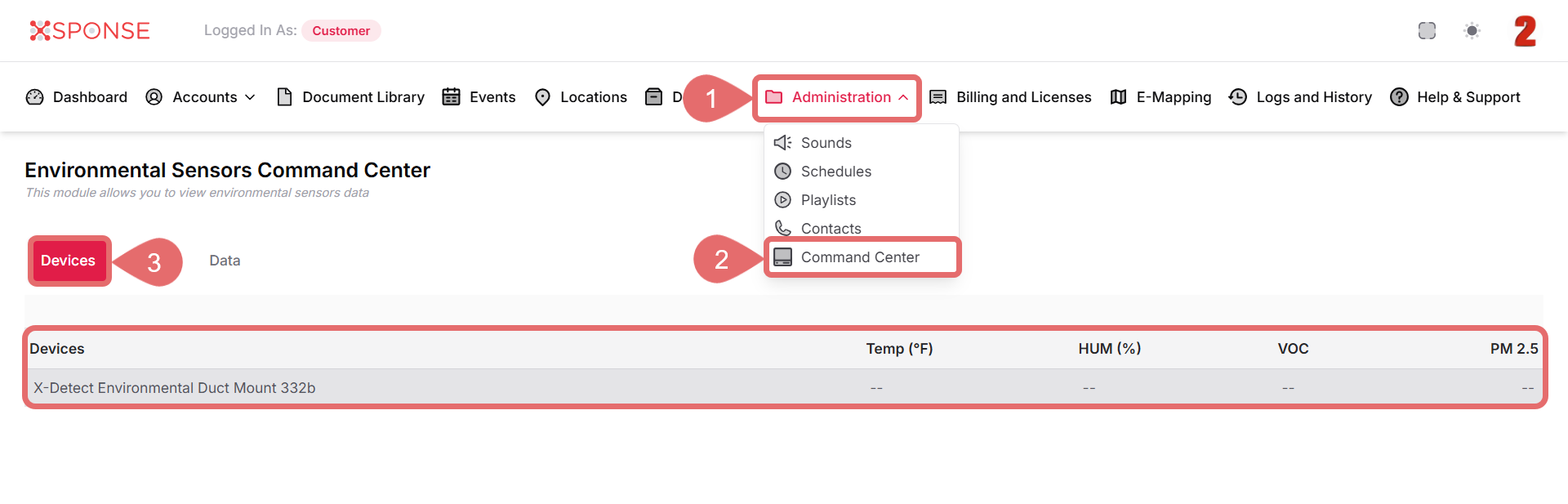
If a device is not reporting data, values may appear as --.
Missing Readings?
If sensor readings show
--, the device may be offline or not transmitting properly. Ensure it is powered on and connected. See Also
To complement your knowledge of this process, check the following pages: